Match footage contains answers, but raw video buries them. A coach watches a goal conceded five times and sees the centre-back stepped up; the players watching once see only the ball in the net. Without annotation, video is just footage. Good football video analysis software lets you stop on the key moment, show the space or the run that mattered, and guide the viewer's eye to it.
DrawTactics Video Analysis is now a desktop app for Mac and Windows (Windows beta). You import match footage, add telestration, track selected players, build freeze-frame scenes and export an annotated MP4 for your team briefing. It is included in the DrawTactics membership (£5.99 per month or £47.99 per year), with no separate video subscription. The app is currently in beta, and tracking accuracy and performance are still being improved. If you only need a quick note on a short clip without installing anything, the browser video tool is still available as a simpler backup, covered further down.
Why Raw Video Fails
Players do not watch match footage the way coaches do. A coach sees the pressing trigger, the passing lane, the defensive line stepping up. A player sees the ball, the goal, the result. Closing that gap requires intervention: pausing at the exact moment, drawing an arrow to the space that should have been closed, highlighting the player who needed to drop.
General video editors such as iMovie or CapCut let you trim clips and add text, but they have no football-specific tools for marking players or showing team shape. Established analysis platforms such as Hudl and Wyscout offer far more depth, and are priced and built for clubs with dedicated analysts. Many coaches need something in between: clear enough to explain one coaching point well, and quick enough to use between sessions.
Before You Start: What You Need
- A computer: a Mac with Apple Silicon running macOS 14 or later, or a Windows 10 or 11 x64 PC (Windows beta).
- Footage: MP4 or MOV files encoded with H.264 or HEVC. Compatibility depends on the video codec as well as the file extension, so a file that will not import may need re-encoding.
- A membership: the desktop app is included in the monthly and annual DrawTactics memberships, alongside the browser tools. There is no free trial.
- An internet connection for sign-in and membership verification. Media processing itself runs locally on your computer, and footage stays in your local project folder.
How to Analyse Match Footage in the Desktop App
1. Import Your Footage
Start a desktop project and import the match footage you want to analyse. Scrub through to the phase you want to explain. Your footage and analysis are kept together in a saved project, so you can come back to it later, adjust it, or build another version for a different audience.
2. Add Telestration
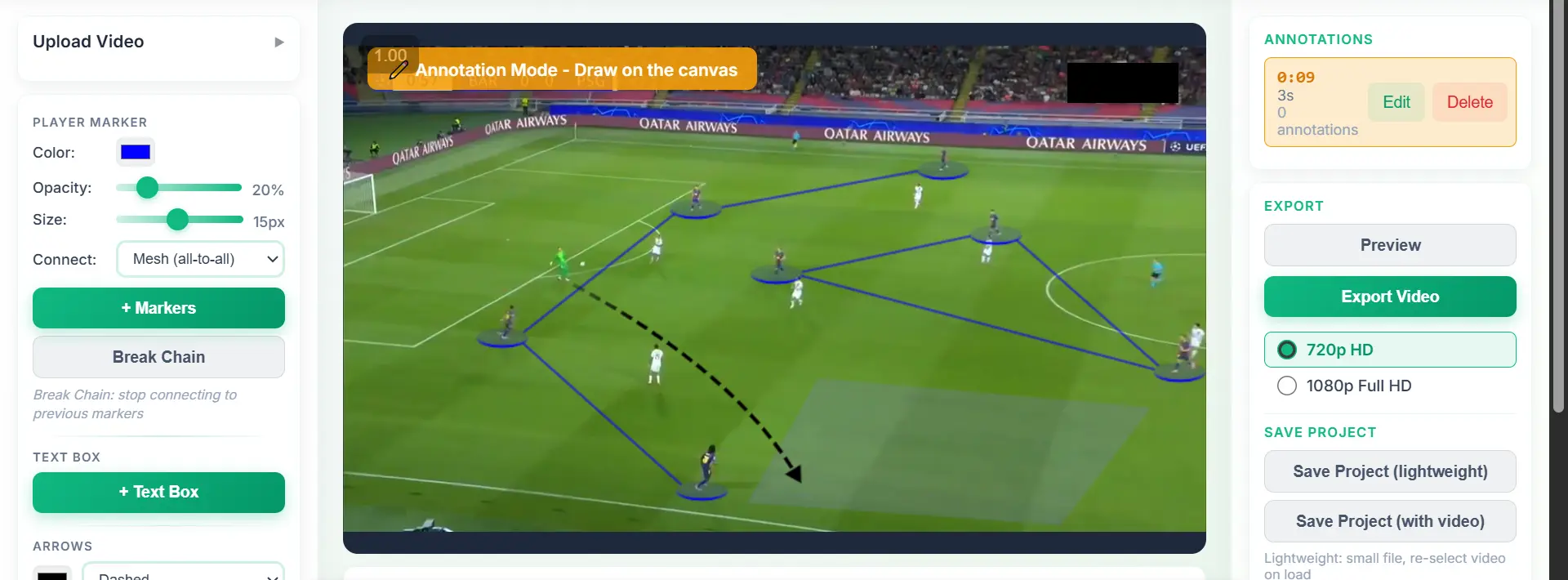
Telestration is the drawing layer over the footage. The desktop app gives you arrows, highlighted zones, text and player spotlights. Use them to show the passing option, the space to attack or the defensive shape. One clear arrow and one zone usually say more than a screen full of graphics, so keep each moment to the one point you want players to remember.
3. Track Selected Players
For movement that only makes sense in motion, use player tracking. Pause at the start of the phase, place markers on the players you want to follow and choose the tracking duration. The markers then follow those players as the footage plays. Connect tracked markers to show relationships between players, such as a back four or a midfield three, and the connections move with them through the sequence.
Tracking needs reviewing. Players crossing, bodies being obscured and camera changes can all cause a marker to drift. When that happens, pause at that moment, move the marker back onto the player, choose the forward duration and use Continue tracking from here. The earlier part of the track is kept and the remaining path is replaced. Check the whole sequence before you export.
4. Build Freeze-Frame Scenes
Stop at the moment that matters and build a freeze-frame scene around it. Place your annotations on the paused frame and set how long the explanation stays on screen: a short hold for a quick cue, longer for a detailed point. Then preview the transition back into moving footage so the clip flows naturally.
5. Preview, Crop and Export
Preview the annotated sequence to check timings, freeze frames and graphics. Choose the crop, then export an MP4 using H.264 video and AAC audio, ready to share with your squad or audience. Your tracked markers and tactical graphics are included in the export.
See the Desktop Workflow
Import footage, annotate the action, track key players and export an annotated MP4. Included in your DrawTactics membership.
Explore Desktop Video Analysis →Use Cases for Football Video Analysis
For Coaches: Individual and Team Development
Show a midfielder exactly when to press by freezing the moment the opposition centre-back receives the ball facing his own goal. Spotlight your player, draw an arrow to the target and add text: "Trigger: back to goal." The player sees the cue, the timing and the action in one clip.
For a defensive problem, track your back four through the phase and connect their markers. As the clip plays, the line visibly stretches or steps up at the wrong time. Freeze on the moment the gap opens, highlight the zone, and the explanation needs few words.
For team meetings, prepare a handful of short annotated clips showing one pattern: how the opposition builds through the centre, where the space opens when they switch play, when to trigger the press. Players tend to understand faster with visual guidance than with verbal description alone.
For Analysts: Tactical Breakdowns
Create clips that highlight tactical patterns, player roles and team shape. When scouting an opponent, freeze the moment they shift from a back three to a back four in possession, annotate the trigger, and show the coaching staff what to expect.
Tracked markers with connections show how a unit's shape changes around the ball. Arrows trace off-ball movement. Zones highlight the space being exploited. Because processing runs locally, footage stays on your computer while you work.
For Content Creators: Clear Explanations
A goal clip with no explanation gets scrolled past. The same clip with an arrow showing the third-man run, a zone marking the space created by the winger's movement and a short line of text explaining the press trigger is far easier to follow. Crop the export to the part of the frame that matters and keep each clip focused on one phase: build-up, progression or chance creation.
No Install? Use the Browser Video Tool
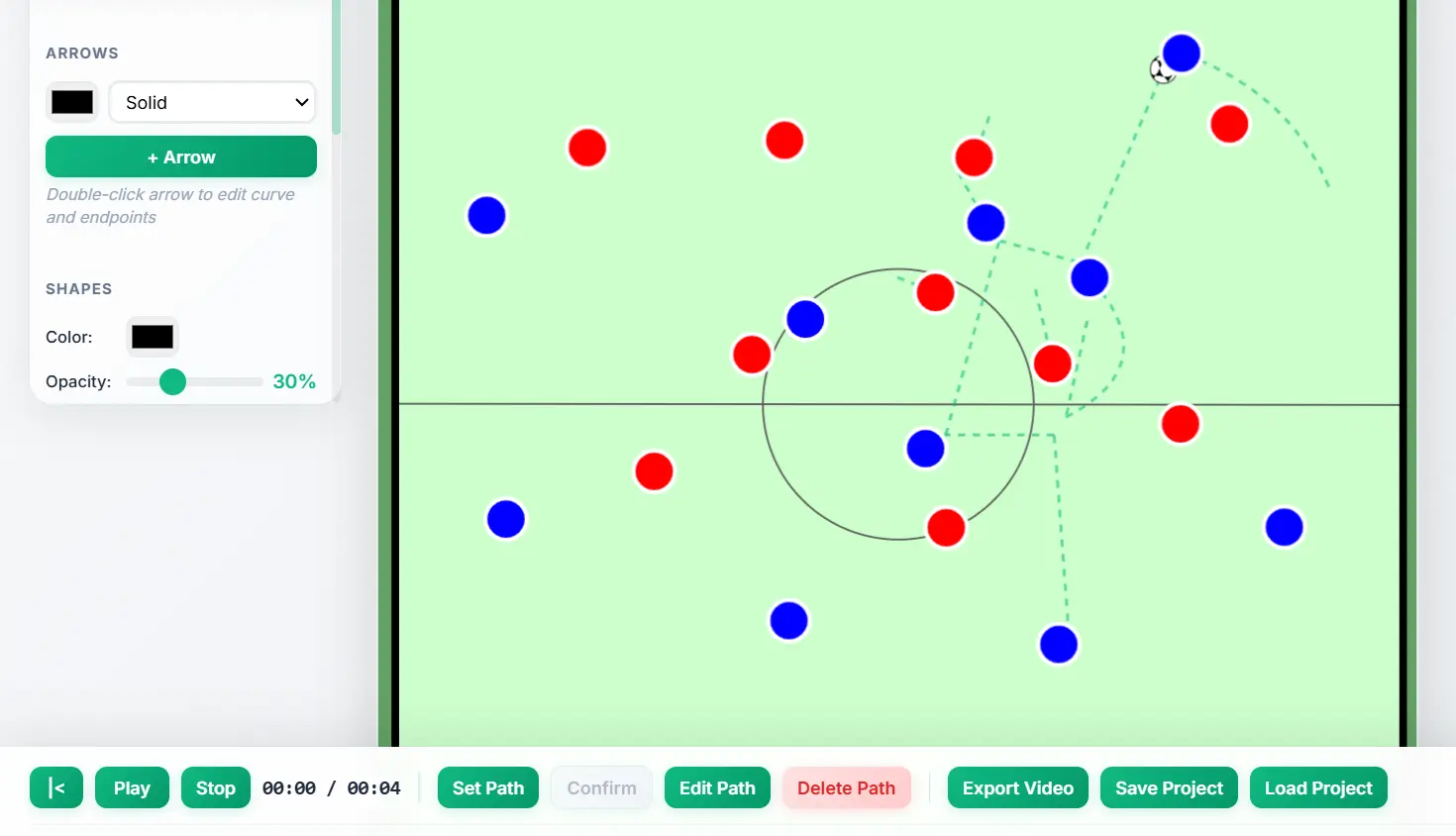
If you are away from your desktop setup, the browser Video Analysis tool handles basic clip annotation without installing anything. It is a simpler backup for quick notes rather than the full workflow:
- Upload MP4, MOV or AVI clips up to 2 minutes long.
- Add timed freeze-frame annotations with player markers, arrows, shapes and text.
- Connect markers in a chain (1→2→3) or a mesh (all-to-all), or use circles only.
- Use a simpler tracking option for short clips.
- Export at 720p or 1080p, at 30fps. The file is MP4 in Safari and usually WebM in Chrome and Firefox.
For tracking with correction, professional telestration and H.264 MP4 export, use the desktop app. Both are included in the same membership.
Video Analysis vs Screenshot Annotation
DrawTactics also offers a Screenshot Annotator for static images: upload a match screenshot, draw arrows and shapes, and export it as an image. This suits set piece diagrams and single-moment analysis. The screenshot tool also includes AI-powered player detection for mapping real match positions onto 2D diagrams.
Video Analysis adds time. The footage plays, pauses on a freeze-frame scene, then resumes, and tracked players carry their markers through the action. Use screenshots for static diagrams and planning; use video analysis for goals, pressing sequences, transitions and movement.
A Worked Example
Import last weekend's match into a new desktop project. Scrub to the goal you conceded. Pause a few seconds before it, place markers on your back four, connect them and track them through to the finish. Correct any marker that drifts when players cross. Add a freeze-frame scene at the moment the striker starts the run in behind: an arrow for the run, a zone for the space that should have been closed, and text: "Line too high, no pressure on ball." Set the scene to hold for a few seconds, preview it, crop to the defensive third and export the MP4 to show in training on Tuesday.
Start Analysing Match Footage
Desktop Video Analysis for Mac and Windows (Windows beta) is included in the DrawTactics membership: £5.99 per month or £47.99 per year, with the browser tools and the other DrawTactics tools.
Get Started →Conclusion
Raw match footage contains the answers, but viewers need help finding them. Football video analysis software bridges the gap between what happened and what should be understood. Freeze frames pause the action, tracked markers show movement and shape, and arrows, zones and text guide the eye.
The DrawTactics desktop app brings import, telestration, player tracking, freeze-frame scenes and MP4 export together in one saved project, with processing on your own computer. The browser tool remains for quick, no-install annotation. Both come with one membership.