
Steps and playback
Add and delete steps, set how fast the players move and how long each step holds, curve runs, loft the ball, and play the animation.
Steps
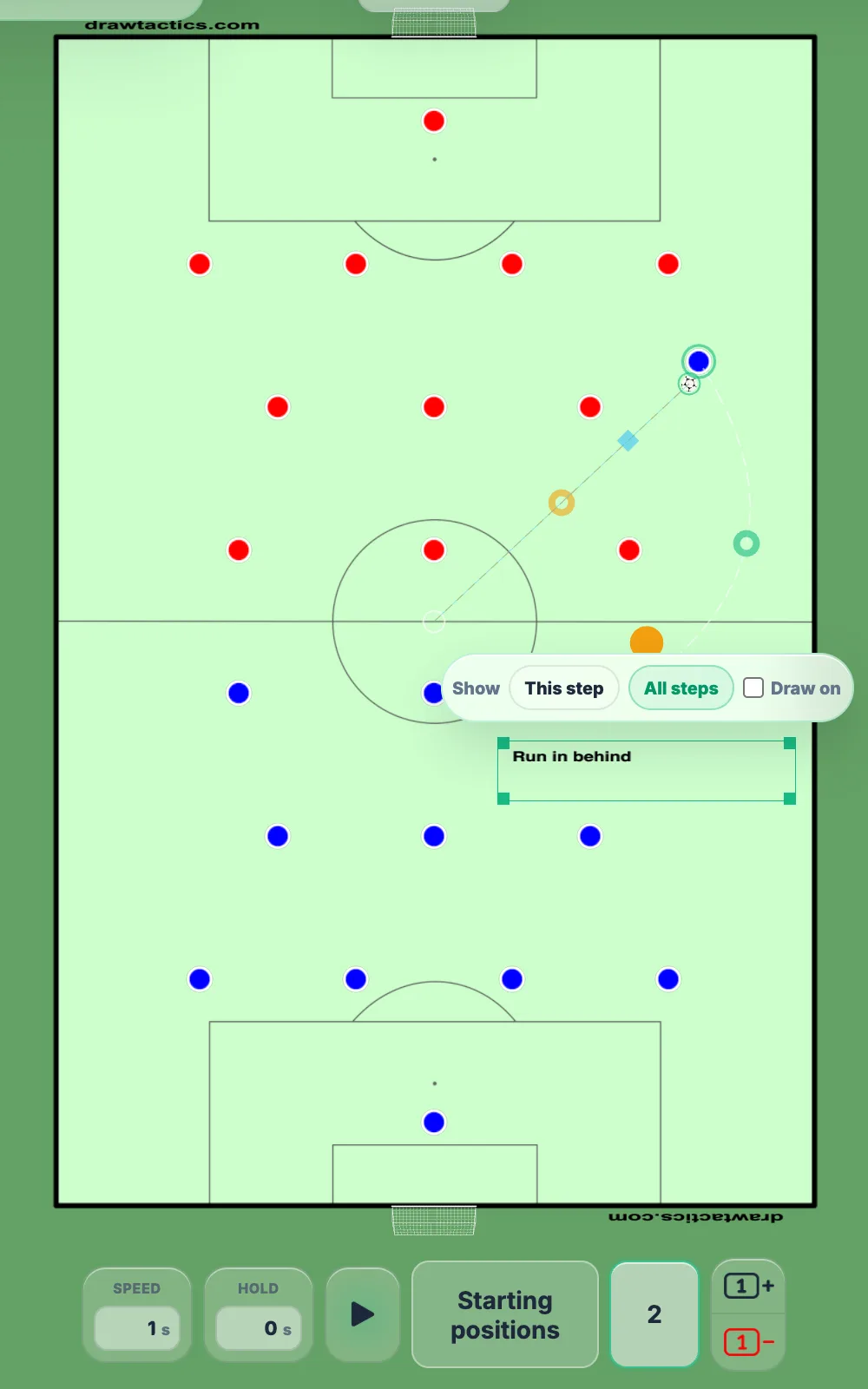
The steps are along the bottom. The first is Starting positions; the others are numbered. Click one to go to it.
- Add step puts a new step straight after the one you're on, with everyone where they are in it. Then move the players and the ball for the new step.
- Delete step deletes the step you're on. The last step left can't be deleted. Drawings shown only on that step go with it.
Steps can't be renamed or moved round: to change the order, delete steps and add them again.
What moves between steps
Only players and balls move. To move one, go to the step and drag it.
- A player or ball you add appears in every step, in the same place. Move it in the steps where it should be somewhere else.
- Delete selected takes a player or ball off the whole animation, not just this step.
- Players turn the shortest way round between steps.
- Cones, goals and mannequins stay put in every step.
- Choosing a formation in the Teams drawer moves the team on the step you're on only.
Paths, curves and lofted passes
On any step after the first, each player or ball that moves in it shows its path: white for players, amber for the ball, from a ring where it starts to a ring where it ends. The paths are only a guide while you edit; they don't show when it plays or in exports.
- Curve a run or pass: drag the round handle in the middle of the path. Drag it back to the middle of a straight line to straighten it.
- Loft the ball: drag the blue diamond on the ball's path up to send the ball through the air, and down to bring it lower. The blue line shows its flight; in 3D you can see the arc. It's only there when the ball moves in that step.
Speed and Hold
- Speed: how many seconds each movement takes, from 0.1 to 30. It's the same for every step.
- Hold: how many seconds the board pauses at the end of each step before the next movement, from 0 to 30, so people can read what you've drawn.
Play
Play plays the animation from the step you're on to the end, and becomes Pause while it plays. At the end it stops; press Play again to start from the beginning. Space plays and pauses.
With nothing selected, ← and → go to the previous and next step, and Home and End to the start and the end.
Drawings in steps
Arrows, shapes, text and connections can show on every step or just one. See Show a drawing on one step or all.
Something missing, wrong or unclear? Tell us and we'll fix it.