
Get started with the Classic Animator
Open the Classic Animator, find your way round it, and make your first move play step by step.
What you need
- A DrawTactics membership. The Classic Animator is part of it, with every other tool.
- A computer or tablet.
The Classic Animator runs in your browser and keeps what you're working on in this browser, so it's there when you come back.
Open the Classic Animator
Open the Classic Animator, or pick it from All tools in the header. It starts with a full-size pitch in 3D, two teams of eleven (red Home, blue Away) and a ball. There's no start window: you set up the board, then add steps.
The Screenshot Mapper's Open in Classic Animator button brings a mapped screenshot here as a new animation.
Find your way round
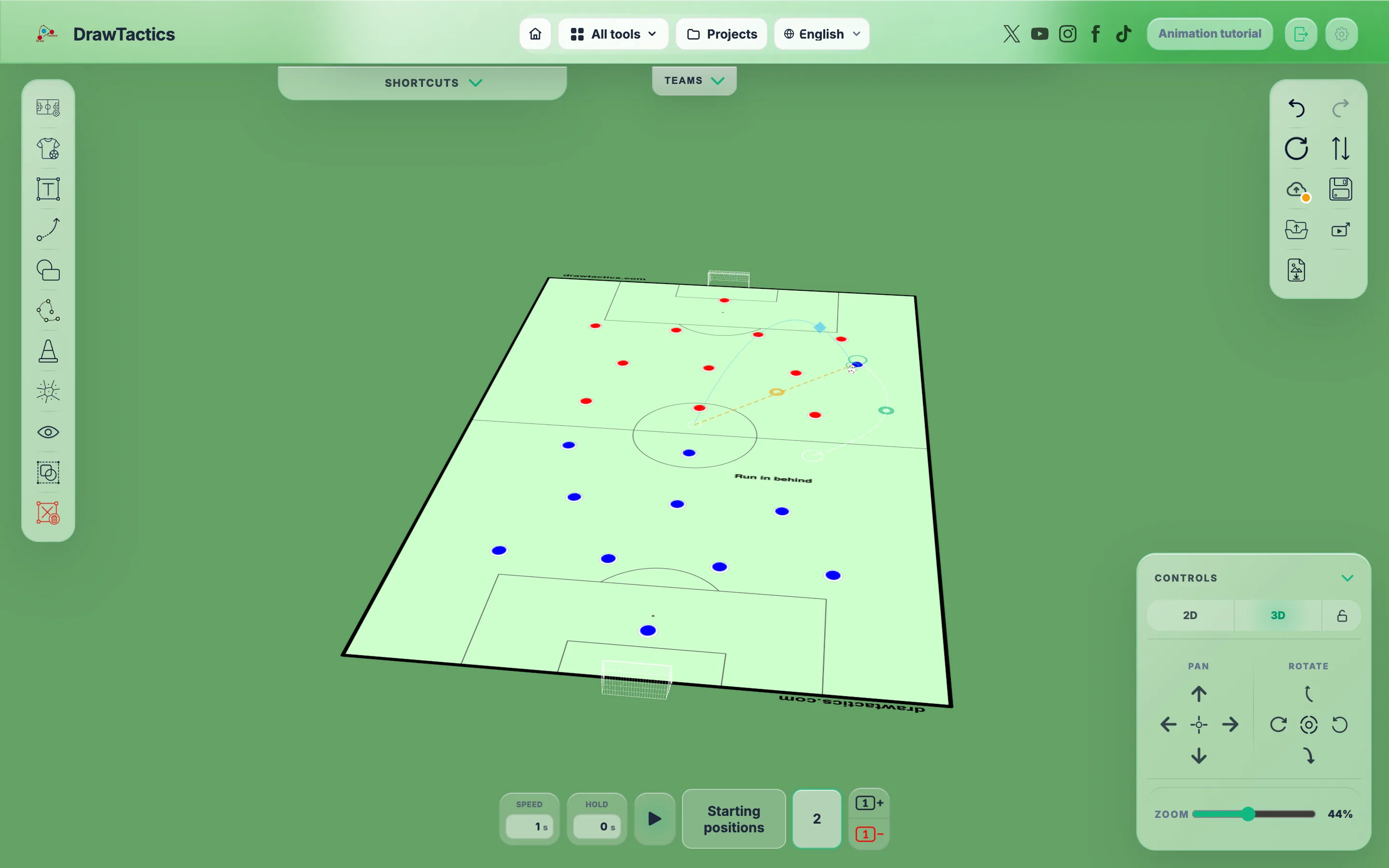
- Tool rail (left): Pitch, Styles, Text, Arrows and lines, Shapes, Connections, Training, Voronoi, Player's Eye, Select multiple and Delete selected. Hover over a button to see its name. Each opens a panel beside the rail; the X closes it.
- Actions (top right): Undo, Redo, Reset board, Flip board, Save to Your projects (the cloud), Download project file, Load project, Export video and Save as PNG.
- Steps (bottom): Speed, Hold, Play, a card for each step, Add step and Delete step.
- Teams (the tab at the top): both teams' formations, names, numbers and colours. See Teams, players and squads.
- Controls (bottom right): 2D or 3D, lock the view, pan, rotate and zoom. See Pitch, view and camera.
- Shortcuts (the tab at the top): the keyboard shortcuts, also on Keyboard shortcuts.
- Animation tutorial (in the header): a short video of the whole workflow.
Make a move in steps
An animation is a list of steps. Playing it moves the players and the ball from where they are in one step to where they are in the next.
- Set up Starting positions, the first step: where everyone is before the move.
- Press Add step. The new step starts with everyone where they were.
- Drag the players and the ball to where they go next.
- Add arrows, shapes, text or connections if you want them.
- Repeat for each part of the move, then press Play.
Speed sets how long each movement takes, and Hold how long the board pauses at the end of each step. See Steps and playback.
Start again
Reset board asks first, then takes off everything, every step included, and puts back the starting pitch, teams and ball. Undo brings it all back.
Something missing, wrong or unclear? Tell us and we'll fix it.