
Plan the week
See a week's sessions on their days, add match days, set how hard each day is, and move sessions between days.
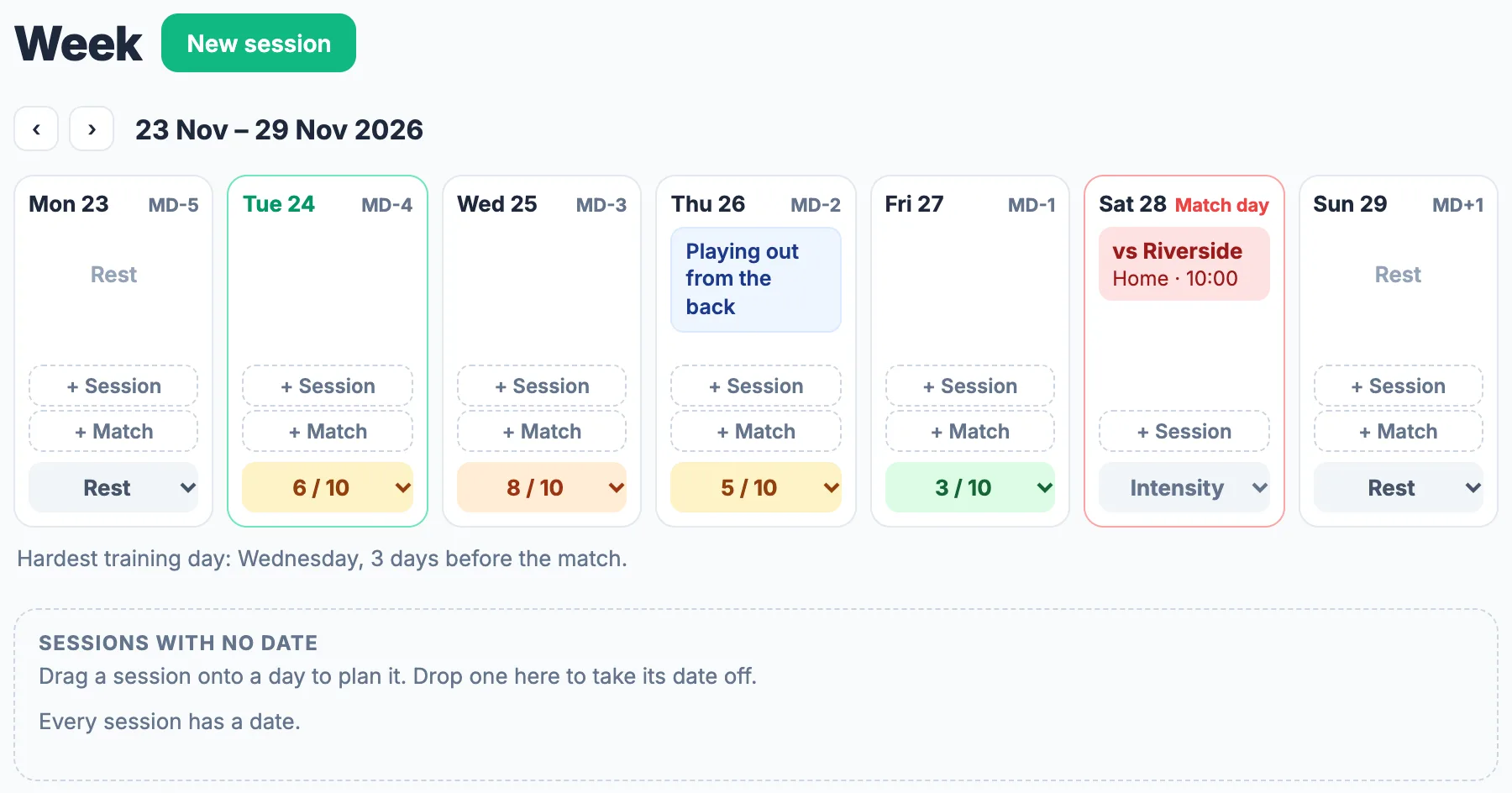
Week, in the sidebar of your list, shows Monday to Sunday with each day's sessions. The arrows beside the dates go to the week before or after.
Add and move sessions
- + Session on a day starts a new session on that day, puts a session with no date there, or copies an earlier session to it.
- Drag a session from one day to another to move it.
- Sessions with no date, under the week, lists sessions without a date. Drag one onto a day to plan it, or drag a session onto it to take its date off.
Moving a session changes its Date, so it opens on its new day. Dragging needs a mouse; on a tablet, use + Session.
Match days
+ Match on a day adds a match: the Opponent, Home or away, and the Kick-off. Remove match takes it off.
The other days are then counted from the match: MD-1 is the day before it, MD+1 the day after, and so on.
How hard each day is
Intensity on each day is Rest, or 1 to 10, coloured from green to red. A line under the week names the hardest training day before the match, so you can see how the week builds up and tapers off.
Something missing, wrong or unclear? Tell us and we'll fix it.