
Read the shot map
The pitch views, the filters, the goal mouth, the xG race and the players' table.
The pitch
Each shot is a dot: bigger for more xG, and filled by its outcome: Goal, Saved, Blocked or Off target (the key is under the pitch). Point at a shot for its details, and click it to change it (see Change or delete a shot).
View, in Settings:
- In Match mode: Full pitch, with Home shooting at the left-hand goal and Away at the right, or Half pitches, the two teams' attacking halves side by side.
- In Team or player mode: Attacking end, or Half pitch.
Colour is White, Green or Dark.
Show only some shots
Show, under the pitch, filters the shots by outcome (goals, on target, saved, blocked or off target), by body part, and by how the chance was made (or Not tagged). Shots that don't match fade on the map and leave the goal mouth, and a line says how many shots are shown and their xG.
The goal mouth
Goal mouth shows where the shots went in the goal, seen from the shooter, for shots you've placed there. See Add shots.
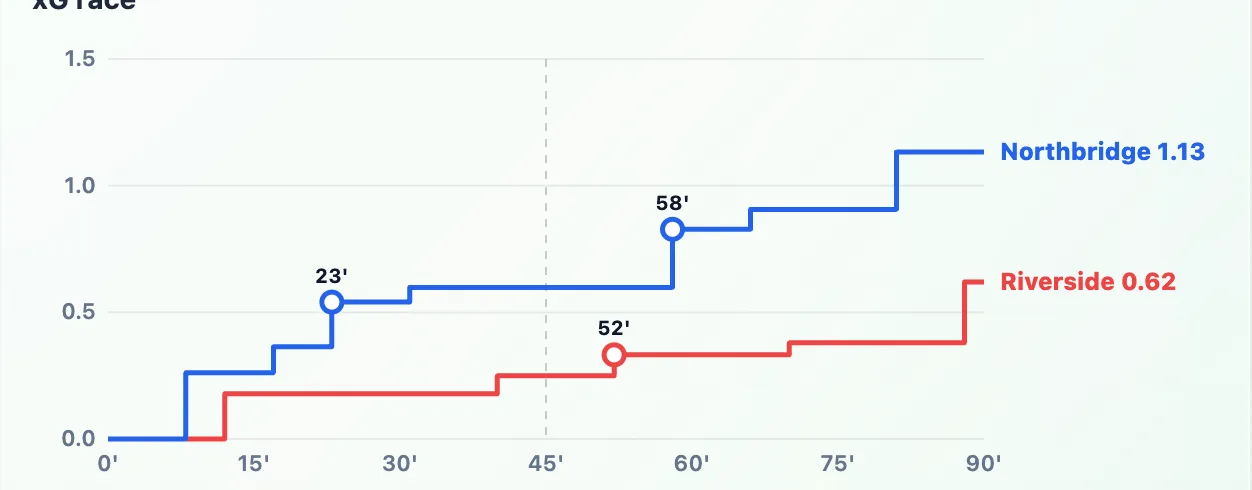
The xG race
xG race shows each team's xG adding up minute by minute through the match, with each goal marked with its minute and scorer, and each own goal as a square marked OG: who was on top, and when. It needs the shots' minutes; a line says how many shots have no minute and are left out.
Players
Players lists everyone with a named shot: their shots, goals, xG and xG per shot. Click a player to pick out their shots (the others fade), and Show every player to go back.
Something missing, wrong or unclear? Tell us and we'll fix it.