
Look through a player's eyes
The 3D view of your screenshot: look around through the player's eyes, switch to other camera views or another player, and change the pitch, kits and what's shown.
Press Open Player's Eye under the screenshot. The moment opens in 3D, through the eyes of the player you selected, with the other players around them and the ball where it was. The player you see through isn't shown, so nothing blocks the view. To label the others with their names, turn on Player names in Show.
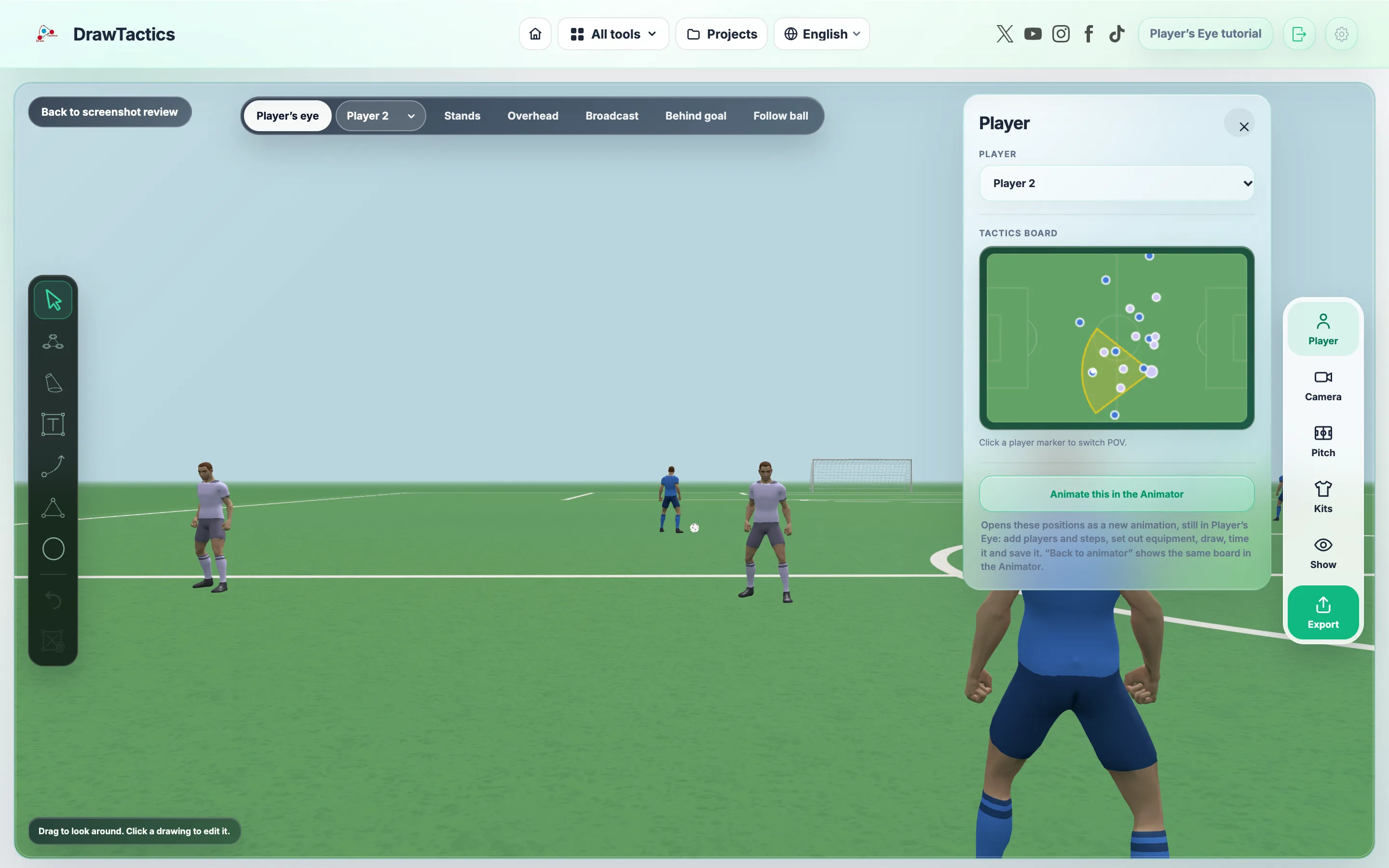
Back to screenshot review (or Esc) goes back to the screenshot and the board, to correct something and open Player's Eye again.
Look around
- Drag to look around.
- Camera (in the rail on the right) has Field of view, how wide the view is, and Look down, how far the player looks down at the grass. Reset view puts the camera back where it started.
Camera views
The buttons along the top switch the view:
- Player's eye: through the player's eyes. The list beside it switches player.
- Stands: from the stands, looking at the pitch.
- Overhead: from directly above.
- Broadcast: from the TV camera position in the stand.
- Behind goal: from behind one goal.
- Follow ball: a camera that frames the ball.
In the wider views, drag to orbit, Shift-drag or the arrow keys to pan, and scroll to zoom. Click a player to see the moment through their eyes. Camera has each view's own settings, such as height, framing and how much of the pitch is in view, and Lock the view keeps the camera still while you draw.
Switch player
- Choose them in the list beside Player's eye, or in Player (in the rail).
- Or click a player on the small tactics board in Player. Its yellow cone shows what the player can see.
- In the wider views, click a player on the pitch.
The pitch
Pitch changes the look: the Grass colour, Mowing stripes, the Markings (standard, or positional play, thirds, fifths or 18 zones), the colour of the Goals, the Ball and its colour, Ad boards round the pitch, and a Stadium around it, by Day or Night.
Kits and looks
Kits sets each team's kit: choose Home or Away, then a Pattern (Solid, Stripes, Hoops, Halves, Sash or Contrast sleeves) and the colours of the Shirt, its Second colour, the Trim, Shorts, Socks and Numbers. Add badge puts a club badge on the shirt from a picture. Use team colours goes back to the colours from the screenshot.
Under the kits, Skin and Hair set the selected player's look; it shows in the Stands and Overhead views.
Your browser remembers kits and looks for next time.
What's shown
Show turns on and off:
- Player names over the players' heads.
- Vision cone in Stands and Overhead: the player's field of view, drawn on the grass in the wider views.
- DrawTactics watermark on exports.
Something missing, wrong or unclear? Tell us and we'll fix it.