Alternativa a TacticalPad: come si confronta DrawTactics
TacticalPad esiste dal 2010 ed è una delle app per allenatori più longeve in circolazione. Funziona su Windows, Mac, iPad, iPhone e Android, copre tanti sport diversi e sul suo sito dichiara più di un milione di download. Chi cerca un'alternativa a TacticalPad di solito lo fa perché vuole un approccio diverso, non perché TacticalPad non funzioni.
DrawTactics è pensato solo per il calcio. Con un unico abbonamento hai la lavagna tattica nel browser, su computer o tablet, e l'app desktop per Mac e Windows (Windows in beta). Oltre alla lavagna 2D e 3D trovi Animation Studio (lo strumento per le animazioni), l'annotazione degli screenshot, l'AI che trasforma uno screenshot in lavagna tattica e l'analisi video desktop. Qui sotto mettiamo i due strumenti a confronto, così puoi scegliere quello più adatto al tuo modo di allenare.
La risposta breve
Scegli TacticalPad se alleni più sport, vuoi un'app per lo smartphone o sei già abituato al suo pianificatore di sedute.
Scegli DrawTactics se alleni solo calcio e vuoi lavagna, 3D, animazioni, strumenti per gli screenshot e analisi video in un unico abbonamento, da usare nel browser o su un computer Mac o Windows (Windows in beta).
I punti di forza di TacticalPad
Tanti sport. Oltre a calcio e calcio a 5, TacticalPad copre pallacanestro, pallamano, hockey su ghiaccio, hockey su prato, rugby, sport gaelici, pallavolo, lacrosse, tennis, padel e altro ancora. Per una scuola o una polisportiva, avere un solo strumento per tutte le squadre è un vantaggio concreto.
Smartphone e tablet. Ci sono app per iPad, iPhone e Android, oltre a Windows e Mac. Se vuoi abbozzare un'esercitazione sul telefono prima di entrare al campo, TacticalPad lo permette. DrawTactics non ha un'app per smartphone.
Pianificazione delle sedute. TacticalPad si presenta come app per pianificare le sedute e analizzare le partite. Puoi creare esercitazioni, moduli e formazioni, vederli in 2D, 3D o in prospettiva, animarli e condividerli come video, immagine, PDF o progetto modificabile.
Una lunga storia. Molti allenatori lo usano da anni, e sono disponibili pacchetti di licenze per società, federazioni e gruppi di quattro o più allenatori.
Dove DrawTactics è diverso
Lavagna, animazione e 3D nello stesso posto
Costruisci il modulo sulla lavagna 2D, poi ruota, inclina e ingrandisci la stessa scena in 3D per spiegare le distanze da un'altra angolazione. In Animation Studio aggiungi i passaggi, sposti giocatori e pallone nella fase successiva e DrawTactics anima la transizione. Con il materiale da allenamento, come coni, porte e sagome, puoi animare anche le esercitazioni oltre alle situazioni di gara. Trovi degli esempi nella pagina della lavagna tattica animata.
Dallo screenshot alla lavagna con l'AI
Carica uno screenshot della partita e lo strumento screenshot-lavagna rileva i giocatori, li raggruppa in base al colore della maglia e li posiziona su un campo 2D. Puoi correggere quello che sbaglia, ma ti risparmi gran parte del lavoro manuale per ricostruire una situazione di gioco. L'analisi avviene nel browser, quindi le immagini restano sul tuo dispositivo. Sul sito di TacticalPad non abbiamo trovato una funzione paragonabile.
Annotazione degli screenshot
Con lo strumento di annotazione disegni frecce, cerchi, zone e testo direttamente su un fotogramma della partita: spesso è il modo più rapido per far passare un concetto nella riunione tecnica o in un post sui social.
Analisi video desktop
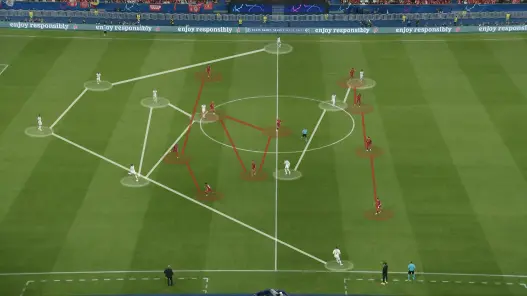
L'app desktop DrawTactics per Mac e Windows (Windows in beta) include l'analisi video per il calcio: disegni sulle immagini della partita, segui i giocatori che scegli con marcatori che puoi correggere, fermi l'azione con i fermo immagine ed esporti un MP4 annotato. Il video viene elaborato in locale sul tuo computer. L'analisi video desktop è attualmente in beta. Anche TacticalPad parla di analisi della partita, quindi se il lavoro sul video è importante per te, confronta la versione attuale di entrambi con i tuoi filmati.
Browser e desktop con un solo abbonamento
La lavagna DrawTactics funziona in un browser moderno su computer o tablet, senza installare nulla. L'app desktop aggiunge esportazioni delle animazioni più fluide e il flusso completo di analisi video. Un solo abbonamento copre entrambi. Le licenze di TacticalPad invece sono legate al tipo di dispositivo: una licenza per computer, una per tablet o smartphone, oppure un pacchetto con una di ciascuna.
Confronto dei prezzi
Prezzi indicati sul sito di ciascuna azienda a ottobre 2026. TacticalPad riporta i prezzi in dollari USA e DrawTactics in sterline, quindi verifica il cambio attuale e i prezzi su ciascun sito prima di acquistare.
| TacticalPad | DrawTactics | |
|---|---|---|
| Piani | US$63/anno (1 computer + 1 tablet o smartphone) US$39/anno (1 computer) US$24/anno (1 tablet o smartphone) |
£5,99/mese o £47,99/anno |
| Piattaforme | App per Windows, macOS, iPad/iPhone, Android | Browser su computer o tablet; app desktop per Mac e Windows (Windows in beta) |
| App per smartphone | Sì | No |
| Sport | Calcio e molti altri sport | Solo calcio |
| Viste 2D e 3D | Sì | Sì |
| Animazione | Sì | Sì (Animation Studio) |
| AI da screenshot a lavagna | Non indicata sul suo sito | Inclusa |
| Analisi video | Cita l'analisi della partita | App desktop (beta) |
| Prezzi per gruppi | Pacchetti per 4 o più utenti | Abbonamenti individuali |
Se ti serve solo un'app per smartphone o tablet, la licenza mobile di TacticalPad costa meno. Se vuoi tutti gli strumenti DrawTactics sul computer, dei due piani DrawTactics l'abbonamento annuale è quello più conveniente.
A quali allenatori è adatto ciascuno strumento
TacticalPad è adatto a: allenatori di più sport e scuole, allenatori che vogliono lavorare dallo smartphone e società che cercano licenze multiple per un gruppo di tecnici.
DrawTactics è adatto a: allenatori di calcio che presentano la tattica a giocatori e staff, match analyst che lavorano su screenshot e filmati delle partite, e content creator che hanno bisogno di animazioni pulite e clip annotate. È adatto anche a chi passa dal computer della società al tablet, perché la lavagna funziona nel browser.
Conclusione
TacticalPad è un'app multisport con una lunga storia, versioni mobile e pianificazione delle sedute. DrawTactics è pensato solo per il calcio, con 3D, animazioni, AI da screenshot a lavagna e analisi video desktop inclusi in un unico abbonamento, tra browser e app per Mac e Windows (Windows in beta).
Se il tuo lavoro parte dai filmati o dagli screenshot delle partite, o vuoi un unico kit di strumenti per il calcio su computer e tablet, vale la pena considerare DrawTactics. Se ti servono più sport o un'app per smartphone, TacticalPad è la scelta più adatta.
Valuta DrawTactics di persona. Lavagna tattica, Animation Studio, strumenti per gli screenshot e analisi video desktop sono inclusi a £5,99/mese o £47,99/anno.